

Shared application environment
Start with the platform already in place.
A new app can use the existing employee identity, organisation selector and navigation. Your team can concentrate on what this application does for the business.
Peripheral by Nepheli
Build internal applications on one multi-tenant platform. File conventions and a declarative DSL connect screens to named operations. Your developers write the business rules in PostgreSQL and can use them from another backend.
Application architecture
Shared application environment
A new app can use the existing employee identity, organisation selector and navigation. Your team can concentrate on what this application does for the business.
Application development
A named read pipeline lists the queries, their order and any transformations. Developers can follow the data in the source. A colleague who reads SQL can review what the application shows and how it was calculated.
Business logic
PostgreSQL functions define business decisions and state changes. Python coordinates requests and integrations. Updating a business rule has a clear starting point, even when several applications use it.
Domain-specific languages
A DSL is a domain-specific language. Peripheral assigns each decision to the language that can express it directly. SQL describes business rules. YAML declares which operation to run and where its inputs come from.
An HTML template and its companion route file share a predictable location and name. Beside a SQL query, the matching .meta file describes its parameters. A developer moving between apps knows where to look.
For an action the platform already supports, the team declares the query, the condition that selects it and the sources of its inputs. The shared runtime interprets the declaration. Developers add Python for specialised orchestration or integrations.
Direct Menu
The menu route selects the same named operation when a form or JSON request asks to change visibility. Its input declaration binds the item identifier and the visibility flag. PostgreSQL updates the item and returns visible or hidden. The function also defines invalid_input and not_found outcomes.
menu.yml
- name: crUd_op_direct_menu_item_visibility_set
  when:
    form: $form.action == 'item_visibility_set'
    json: $json.action == 'item_visibility_set'
Visibility input · .meta
p_is_visible:
  type: bool
  from:
    form: $form.p_is_visible
json: $json.p_is_visibleIn Next.js, a file’s location defines the route to a page. The convention has spread across ecosystems, from SvelteKit to Expo Router for mobile apps. Open a second Peripheral app and you already know where to look. An HTML template or Python handler can have a same-named .yml file alongside it declaring that route’s methods, roles and operations.
Next.js · App Router · SvelteKit · Routing · Expo Router
new-payment.yml declares a direct database query and the payment_context read pipeline. The pipeline names its three reads. In new-payment.html, Jinja2 can read the SQL results from payload.db_results and the available counterparties from payload.pipelines.payment_context.counterparties.external_api_bootstrap_json.If an AI agent invents a step reference or refers to a result before it exists, the pipeline check rejects the declaration. A developer taking over the change can follow the same trail from route to SQL and judge whether the business rule is right. These conventions give the agent fewer decisions to guess at and the developer fewer architectural details to memorise between apps.
Application gallery
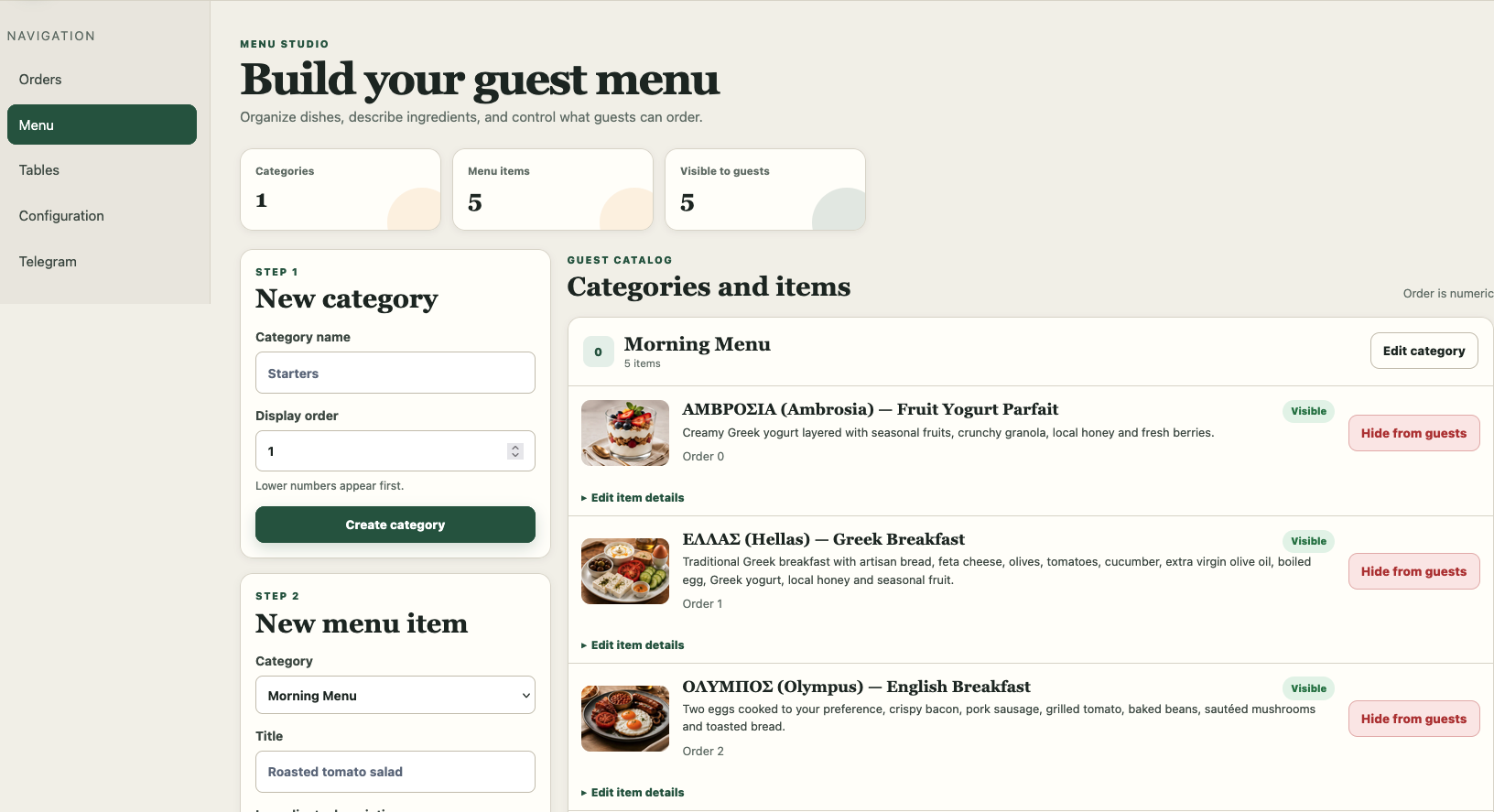
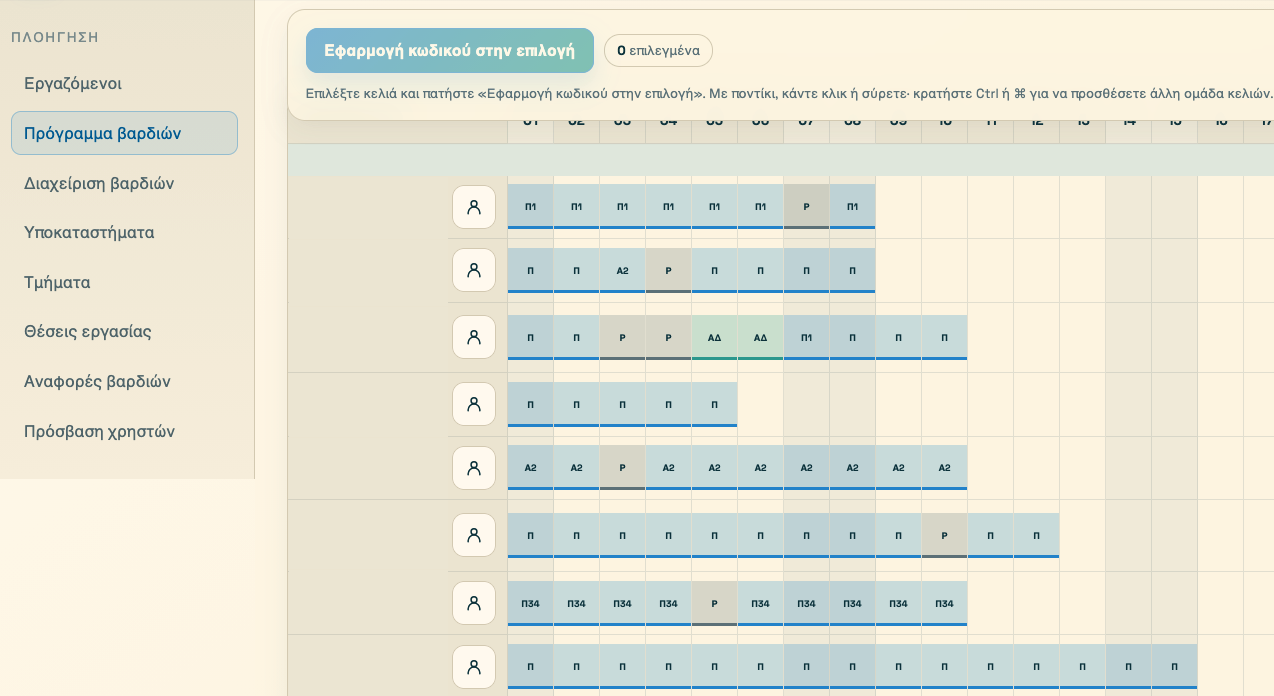
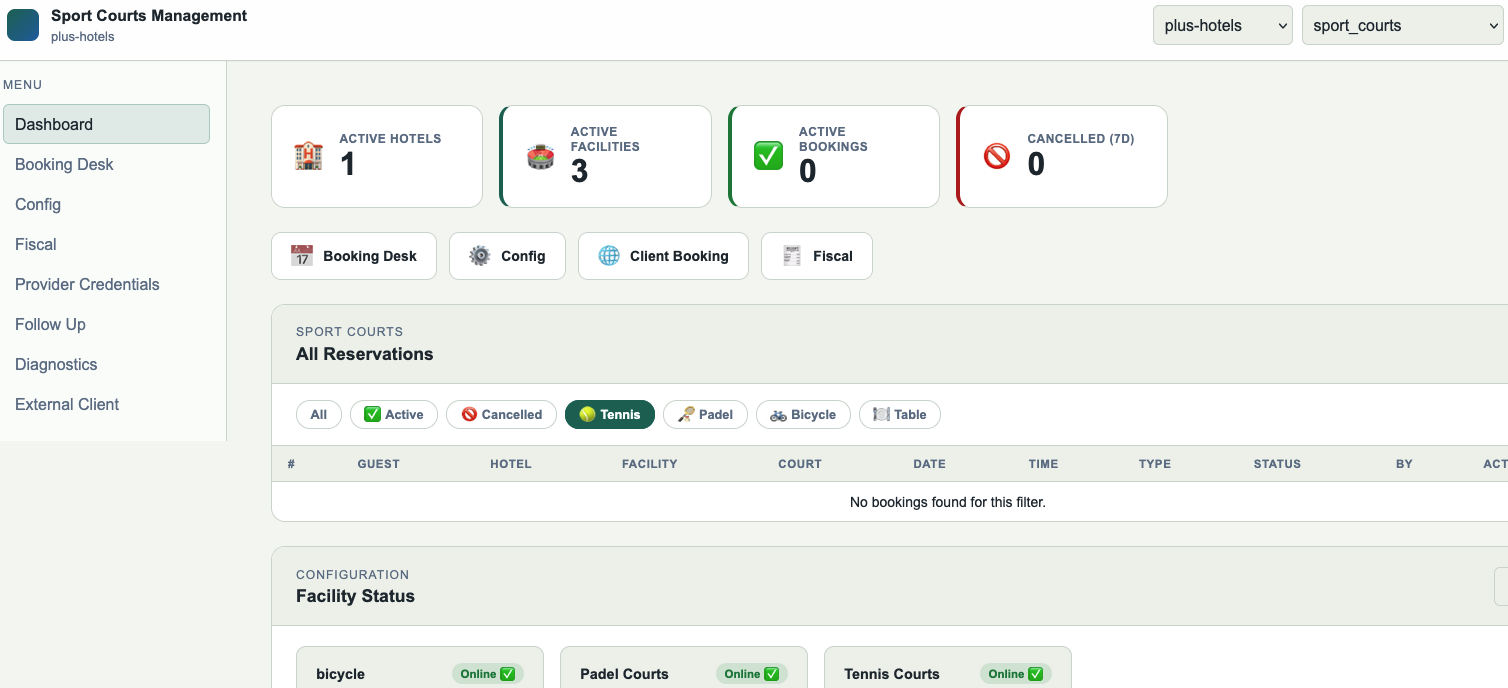
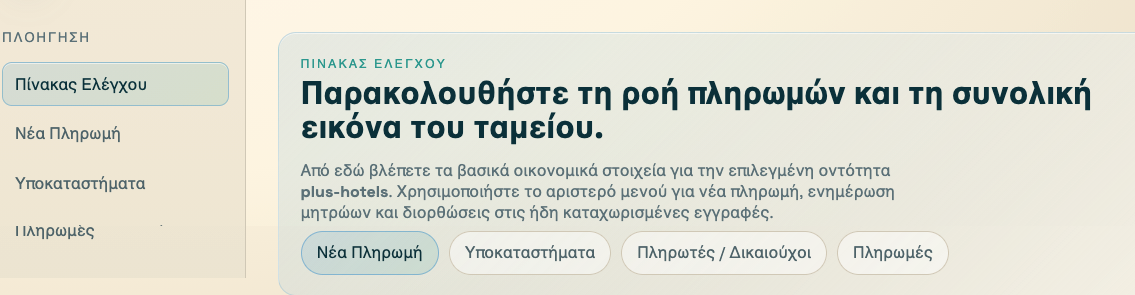
A restaurant menu, a shift roster, a sports desk and a cashier each need a different interface. These four apps run on Peripheral.
 Enlarge image
The restaurant team adds dish photographs and descriptions, groups dishes into categories and chooses which items guests can see.
 Enlarge image
A supervisor can select several cells in the roster and assign the same shift code to all of them in one action.
 Enlarge image
The sports desk can filter reservations by activity and see which facilities are online, from padel courts to bicycle hire.
 Enlarge image
From the dashboard, the finance team can start a payment or open the registers of branches, payers and beneficiaries for the selected organisation.
Identity & access
Employees choose an organisation and an authorised app from the shared navigation. Their account travels with them. The active tenant sets the data context, and the role assigned in that app determines which actions are available. A new internal app can use the same account, selectors and menu.
| Scope | What it determines |
|---|---|
| Organisation | The active tenant |
| App assignment | Which app the employee can open |
| Role in the app | Which actions the employee can take |
Maintenance & handover
Peripheral generates the starting folders for routes, templates, metadata, SQL and migrations. Apps can reuse the HTMX layout for navigation. When a developer takes over an app, those conventions point to the files behind a screen and the SQL a colleague can review with them. Developers can use their usual editor and choose whether to work with AI.
apps_logic/<app>/
routes/html/
pipelines/
sql_logic/
db_migrations/
Routes and templates define the screen. Named read pipelines describe how data is assembled. SQL files and their input metadata define operations, and migrations keep schema changes with the app.
Preflight checks inspect the source layout and validate the declarations that connect routes, queries and read pipelines.
The CI workflow calls the broader integrity checks and the regression suite. Reviewers can use those checks when a change spans several files.
Pages & integrations
A compatible Peripheral page can serve a human in a browser or another application. Both receive data from the same operation under the same organisation and app permissions.
HTTP Accept
Accept: text/htmlThe shared shell presents the result as an HTML page. Templates control how the data appears and HTMX handles navigation within the application.
HTTP Accept
Accept: application/jsonThe caller requests JSON and receives the authorised page data directly. A team integrating that page can reuse the existing data path and its access checks.
In Direct Menu’s kitchen queue, a pending order has an active “Done” button. Once the order is complete, the HTML from the server enables “Not done”. The form already contains the method, the address and the status change to submit.
The original model for REST was the Web itself. In 2000, Roy Fielding described its architecture as Representational State Transfer. One of its constraints is HATEOAS (Hypermedia as the Engine of Application State). Just as a browser discovers where it can go from the links on a page, here it discovers what it can do from the form on the order.
Fielding · REST §5.1.5 · REST and the Web · REST APIs must be hypertext-driven
HTMX islands
In Direct Menu, the kitchen queue declares which event it listens for, where to fetch the HTML and which part of the screen to replace. Read the queue’s own markup and you can follow the whole refresh. This is what HTMX calls locality of behaviour.
Direct Menu / routes/html/index.html
<section id="dm-order-feed"
  hx-get="/direct_menu"
  hx-trigger="dm-refresh-orders from:body"
  hx-select="#dm-order-feed"
  hx-target="#dm-order-feed"
  hx-swap="outerHTML">
HTMX selects the order feed from the returned HTML and swaps it into that same spot on the page.
For a team maintaining several apps, that choice determines what has to change when a client requests a new rule or when the team replaces a service.
Phoenix gives Elixir applications a predictable layout through generators such as mix phx.gen.html. In LiveView, the initial app.js already includes the client that connects a page over a WebSocket. In Peripheral, the shared template loads htmx 1.9.10 with the page. A developer can declare a connection with hx-ws on the HTML element that needs live updates.
In Supabase, application code can call a PostgreSQL function through rpc(). In Peripheral’s Direct Menu, for example, PostgreSQL decides whether a restaurant is taking orders right now. In both designs the application can call the rule where the data lives.
A configured workflow step can call a PL/SQL stored procedure. Its parameters can be exposed as activity attributes, so different steps can use the same procedure with different inputs.
A customer implementation can add checks in the stored procedure SBO_SP_TransactionNotification. Transaction validation becomes a place to apply a company rule across the application.
In Entersoft’s example, changing the customer or business unit on a sales document triggers a SQL calculation. The database sums that customer’s turnover for the selected company and unit, and the application fills the document field with the result.
Business logic without vendor lock-in
Can a guest place an order now? In Direct Menu, a PostgreSQL function reads the business timezone and ordering hours. It tests the local time, including the opening minute and excluding the closing time. If the team adds a service in Go or Rust, it can call that same function on its PostgreSQL installation. Change the opening hours once and both services use the revised schedule.
Peripheral can serve as an application incubator. The team can keep the other screens in Peripheral and move one service at a time.
A replacement service supplies the tenant and user context, enforces the same permissions and preserves the transaction boundary. Teams can adapt the screens and route declarations independently.
Evaluating a switch
Choose one operation from your internal SaaS stack. A developer can trace its implementation while the person responsible for the business rule explains the behaviour the team needs to preserve.
Start with the current entry point, the code that makes the decision and the screens or services that call it. Include the user roles, tenant scope and transaction boundary the operation depends on.
Identify the rule that belongs in PostgreSQL. If it already lives there, assess whether Peripheral can call it as it stands. List the screens, integrations and access checks that need adaptation.
In a test environment, run representative inputs through the current and proposed paths. Compare outputs, errors and database changes for each relevant role and tenant.
Ask a developer who did not implement the change to locate the rule, make a small revision and run the checks. Use that experience to decide who will maintain the application and whether to move another operation.
Working with Nepheli
Explore the underlying architecture in Mycelium, the public open-source evaluation edition. Then ask to see the commercial Peripheral distribution, including its newer named read pipelines, query contracts and shared application shell.
Agree which platform and application files your team receives, what it can change and how it can use the source after handover. Choose any implementation services separately.
Developers can work through a real change in their own application. A colleague who reads SQL can trace the same rule and confirm that it reflects the intended policy.
Your team can operate and extend the application. Optional arrangements with Nepheli can cover annual maintenance, hosting, support or custom development, with responsibilities agreed for each service.
Technical leads and investors can discuss a separate architecture engagement on how these design principles might apply to another codebase or portfolio.